Share this post


.svg)
Video editing bottlenecks are the operational and technical friction points that slow down a content team's ability to produce, revise, and publish video at scale. The most common causes include raw footage backlog, unclear creative briefs, codec render lag in tools like Adobe Premiere Pro, and single-editor overload across multiple output formats. Left unresolved, these bottlenecks don't just delay content, they cap your entire production ceiling.
This guide is written for US-based marketing agencies and SaaS content teams producing 10 or more videos per month who are hitting output ceilings with their current in-house setup.
Quick Answer: Video editing bottlenecks happen when your production pipeline produces footage faster than your team can edit, revise, and publish it. The fix isn't always hiring another in-house editor, it's restructuring the workflow around a dedicated offshore video editor who handles the full editing pipeline within your existing toolstack, at a fraction of the cost.
Key Takeaways:
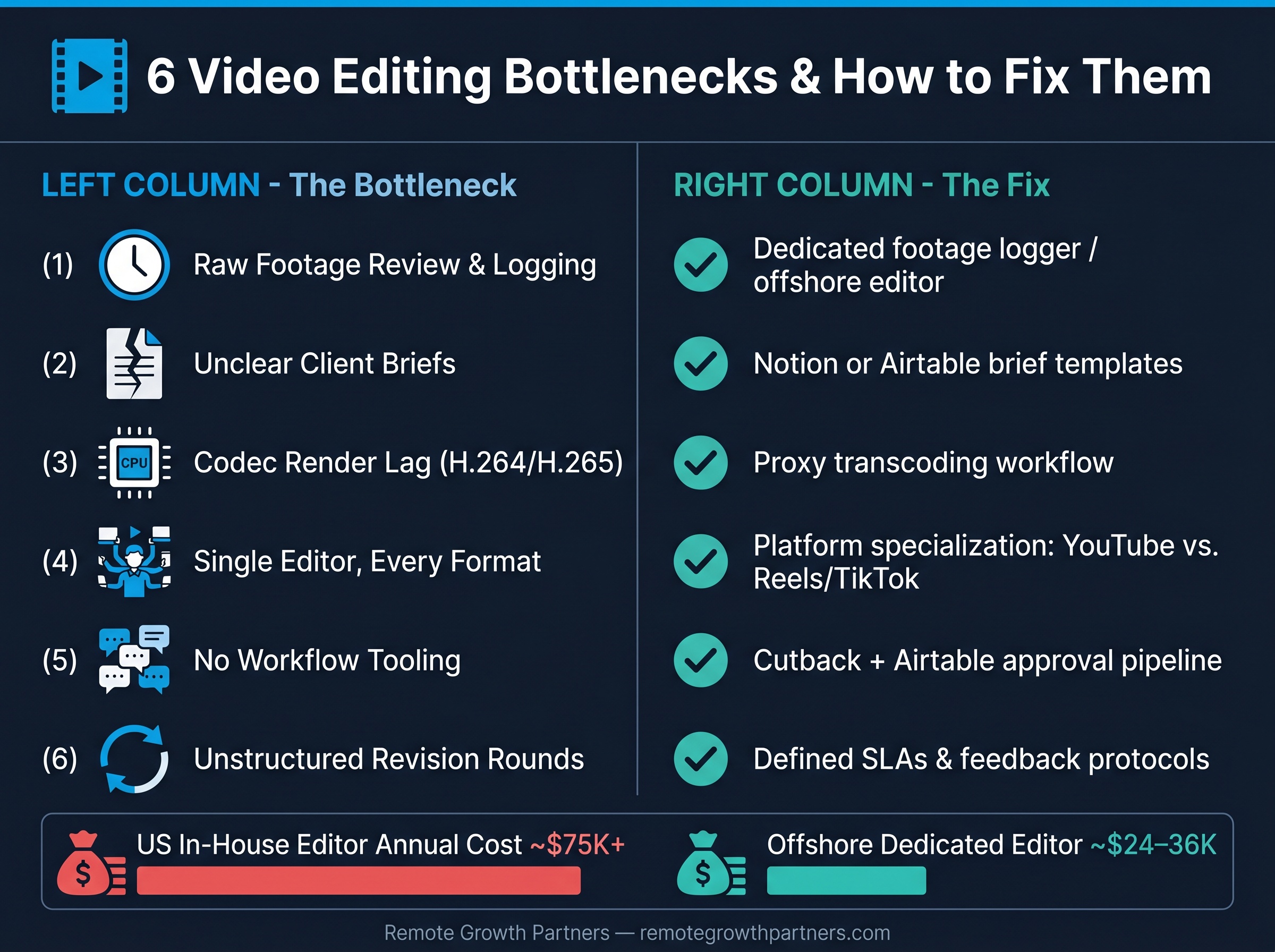
- The six most common video editing bottlenecks in 2026 are footage logging, unclear briefs, codec render lag, format overload, missing project management tooling, and unstructured revision rounds.
- Technical bottlenecks from H.264 and H.265 Long GOP codec structures cause real scrubbing and render lag in Adobe Premiere Pro, proxy transcoding solves this.
- AI editing tools help with transcription, rough cut assembly, and auto-captions but can't replace human judgment on brand voice or platform-specific pacing.
- A second in-house US editor costs $65,000–$90,000 per year fully loaded and doesn't solve the workflow infrastructure problem.
- Remote Growth Partners places dedicated offshore video editors, full-time and single-client, integrated into your Notion, Airtable, Adobe Premiere Pro, and Cutback workflow.
Most content managers assume their editing problem is a creative one. The editor is slow, or the cuts aren't tight enough, or the color grading looks off. In reality, the majority of bottlenecks are operational, and they start well before anyone opens Adobe Premiere Pro.
Operational bottlenecks include things like raw footage arriving with no logging notes, client briefs passed over Slack with half the information missing, revision rounds driven by vague feedback like "make it feel more energetic," and zero file management structure so editors spend 20 minutes hunting for the right take. These are workflow failures, not talent failures.
Technical bottlenecks are a separate category. These come from codec compression behavior, interframe dependency in H.264 and H.265 files, and the hardware demands of scrubbing through high-bitrate footage without proxy files set up.
When output slows down, the gut reaction is to tell the editor to work faster, or to start looking for a replacement. Neither addresses the actual failure point. If the brief is missing key information, a faster editor still produces the wrong cut. If raw footage isn't logged, a more experienced editor still wastes an hour finding the right B-roll.
The diagnosis has to start upstream.
Raw footage review is invisible work. Nobody counts it as editing time, but it often takes 30–45 minutes per hour of recorded footage to log usable takes, find the best B-roll, and note timecodes. Multiply that across a team producing 15 videos a month and you've lost days of productive editing time to a task that should be systematized.
A client brief that says "make a 60-second Instagram video about our new feature" is not a brief, it's a starting gun for guesswork. When editors have to interpret intent, they produce cuts that require two or three revision rounds to land. Each round adds 2–4 hours of editor time and delays the publish date.
This one is technical, but it's real. H.264 and H.265 files use Long GOP compression, which means the codec stores only some frames as full images (I-frames) and encodes the rest as changes relative to surrounding frames. Scrubbing through this in Adobe Premiere Pro forces your CPU to decode every interframe backward and forward to render the current frame, creating lag even on powerful machines.
A YouTube long-form video and a 15-second TikTok are genuinely different craft skills. Pacing, caption style, hook structure, B-roll density, all of it differs by platform. When one editor handles everything, either quality suffers or turnaround time suffers. Usually both.
Slack threads die. Email attachments get buried. When creative briefs live in chat, there's no version history, no approval trail, and no single source of truth. Project management tools like Notion and Airtable exist specifically to solve this, but many in-house teams skip them until the problem becomes undeniable.
"Can you just punch it up a bit?" is not actionable feedback. Without a defined revision protocol, specifying what gets addressed in round one vs. round two, how feedback is submitted, and what constitutes a final approval, revision loops compound. Three revision rounds where two were avoidable is a half-day of wasted editing time per video.
When a camera records in H.264 or H.265, it uses a compression structure called Long GOP (Group of Pictures). Within this structure, only certain frames, called I-frames, are stored as complete images. The frames between them (P-frames and B-frames) are stored as deltas: partial data describing what changed from the previous or next I-frame.
This is efficient for file size. It's inefficient for editing. When you scrub the timeline in Adobe Premiere Pro, the software has to decode all the interframe data around your playhead position to reconstruct each frame. On a timeline with multiple streams of H.264 or H.265 footage, this creates the stuttering, lag, and dropped frames that slow editors down and raise export times dramatically.
The practical impact: According to Adobe's own documentation on proxy workflows ↗, editors working with native H.264/H.265 footage from modern cameras can see 3x–5x performance improvements after transcoding to proxy files in formats like ProRes or DNxHR.
Proxy files are lower-resolution, intraframe-encoded copies of your original footage. Because intraframe codecs (like Apple ProRes) store every frame as a complete image with no interframe dependency, scrubbing and real-time playback become dramatically faster. Adobe Premiere Pro links the proxy to the original, so you edit on the proxy and export from the full-resolution master.
Setting up a proxy workflow in Premiere is a 15-minute configuration task. Most teams that don't have it in place simply haven't prioritized it, and their editors are paying the price in render lag on every project.
AI video editing tools have gotten genuinely useful in specific, bounded tasks. Transcription is the clearest win, tools like Descript and Opus Clip can transcribe a 45-minute interview in under two minutes, giving editors a searchable text layer to work from. This speeds up rough cut assembly because editors can identify the best sound bites by reading rather than scrubbing.
Auto-captioning has also improved significantly. Modern AI captioning tools handle most speaker voices accurately, reducing the manual captioning burden for talking-head video content considerably. B-roll tagging, where AI analyzes footage and adds semantic labels to clips, is still early-stage but useful for large asset libraries.
According to MIT's Computer Science and Artificial Intelligence Laboratory ↗, AI-assisted video processing can reduce pre-production annotation time by up to 40% in structured workflows, though human oversight remains essential for quality control.
No. AI video editing tools accelerate specific mechanical tasks but cannot replace the editorial judgment a skilled human editor brings. Brand voice, platform-specific pacing, the decision to cut on a reaction rather than a word, audio engineering choices that make a talking-head video feel intimate vs. broadcast, these require taste, experience, and context that AI tools don't have. AI removes friction from the start of the workflow. A human editor makes the work worth watching.
According to Bureau of Labor Statistics wage data ↗, the median annual salary for a video editor in the US is approximately $62,000. Add employer payroll taxes (7.65%), health benefits, equipment, software licenses (Adobe Premiere Pro Creative Cloud runs $599/year per seat), and you're at $78,000–$92,000 in fully-loaded annual cost, before recruiting fees.
| Cost Component | US In-House Editor | Offshore Editor via RGP |
|---|---|---|
| Annual base salary | $62,000–$75,000 | $18,000–$28,000 |
| Payroll taxes + benefits | $12,000–$18,000 | Managed by RGP |
| Equipment + software | $2,000–$4,000 | Editor-supplied |
| Recruiting cost | $6,000–$12,000 | Included in RGP fee |
| Management overhead | High | Low (dedicated account mgr) |
| Estimated total annual cost | $82,000–$109,000 | $28,000–$42,000 |
Here's what most teams miss: if your bottleneck is a broken brief process or no project management tooling, adding a second editor means two editors dealing with a broken brief process. You double headcount and double the confusion. The infrastructure has to come first.
Remote Growth Partners places offshore video editors as full-time, single-client employees. That distinction matters. Shared editors on freelance platforms are managing five clients simultaneously, your urgent project competes with four others for attention. A dedicated editor who works exclusively on your content learns your brand, your pacing preferences, your client's style quirks, and your revision patterns. Throughput becomes consistent because context doesn't reset with every new project.
RGP vets editors for platform-specific skills. A YouTube long-form specialist understands chapter structure, retention curve pacing, and how to build a 20-minute video that doesn't lose viewers at the eight-minute mark. A short-form specialist knows hook architecture, caption animation timing, and the audio engineering requirements for TikTok's compressed audio pipeline.
These are different skills. Matching the editor to your primary output format is one of the highest-use placement decisions RGP makes.
A common hesitation: "Will an offshore editor actually work within our systems?" The answer is yes, provided you've set the systems up, which is why Step 3 of the transition process below matters so much.
RGP's offshore video editors work natively in Adobe Premiere Pro as their primary NLE. They use Notion or Airtable for brief management and task tracking, and Cutback for structured client review and approval, replacing the "send a Vimeo link and wait for Slack messages" feedback loop with a timestamped, organized approval process.
Map the last 10 videos you published. Where did each one get delayed? If delays cluster around footage arriving without logs, the problem is upstream. If they cluster around round three of revisions, the brief or feedback process is the issue. Don't guess, count.
An offshore editor can't read your mind, and neither can an in-house one. Before your new editor starts, build a reference document that covers: color grading preferences, approved music genres and licensing sources, SFX usage guidelines, caption font and style, intro/outro templates, and any client-specific rules. This document pays dividends on every single video.
The system has to exist before the editor joins. Build your brief template, your asset handoff checklist, and your approval workflow in Notion or Airtable first. A new editor should be able to pick up a brief and start editing with zero back-and-forth on Day 1. If they can't, the system isn't ready.
This is where most hiring processes cut corners. A portfolio review tells you what an editor has done. A paid real-work test tells you what they'll do with your actual content, your brief, and your timeline. Learn more about how RGP vets offshore video editors, the four-stage process that includes exactly this kind of real-work evaluation before any placement is confirmed.
Before your editor produces a single cut, agree in writing: how many revision rounds are included per video, what constitutes a revision vs. a new brief, how feedback is submitted (Cutback timestamps, not Slack voice notes), and what the expected turnaround is per video type. These SLAs protect both sides and eliminate the ambiguity that makes revision loops expensive.
Ask for three to five examples per platform you produce for. Watch them. Does the YouTube content hold attention past the five-minute mark? Do the Reels have a hook in the first two seconds? Is the color grading consistent with modern platform aesthetics? Generic editing portfolios are a red flag, platform specialization is the signal to look for.
During the interview, ask the candidate to walk you through their proxy workflow setup in Adobe Premiere Pro. Ask how they handle B-roll sourcing when client footage is thin. Ask what their process is for music sync on a 90-second product video. These are not trick questions, a skilled editor will have clear, specific answers. For more structured interview guidance, check 8 interview questions to vet offshore video editors.
An offshore editor working across time zones needs to be a strong async communicator. They should give daily progress updates without being asked, flag blockers in writing before they become delays, and know how to write a clear brief question that doesn't require a 30-minute call to answer.
Hiring is its own bottleneck. Job posts, screening calls, portfolio reviews, test projects, offers, compliance paperwork, for a role that may not work out, this process eats 40–80 hours of internal time before an editor turns in a single cut.
Remote Growth Partners handles the sourcing, skills assessment, platform-specific portfolio review, and live structured interview. By the time a candidate reaches you, they've cleared three filters. If you want to understand how RGP's hiring process works end-to-end, the process is documented in detail.
The paid real-work test is the differentiator. Candidates receive a real brief with real footage, representative of what your team actually produces, and submit an edited cut under real deadline conditions. This test consistently eliminates the majority of candidates who looked strong on paper.
"The paid real-work test is the step that separates editors who can follow a template from editors who can think," says the Remote Growth Partners placement team. "We've had candidates with impressive portfolios fail the test completely, and that's the point."
This stage also surfaces communication behavior, file management habits, and brief interpretation skills that no portfolio or interview can reveal.
If you want to explore where candidates come from, best countries to hire offshore video editors covers the regional breakdown with skill-set and time-zone considerations.
The 80/20 rule applied to video editing states that roughly 80% of your production delays come from 20% of your workflow tasks. In most agency and SaaS content teams, that 20% is: footage review with no logging system, first-draft cuts built from vague briefs, and revision rounds driven by unstructured feedback. Fix those three failure points and most output problems resolve, regardless of how many editors you have.
The 321 rule is a file management and backup discipline: keep 3 copies of every project file, on 2 different storage types, with 1 copy offsite (or in cloud storage). For teams working with raw footage and multi-stream Premiere Pro timelines, losing a project to a drive failure mid-edit is a recoverable disaster only if the 321 rule was followed. It's basic file management hygiene that offshore editors should follow by default.
The 5 C's of video editing are: Cut (removing what doesn't serve the story), Color (color grading for consistency and mood), Correct (audio engineering corrections, exposure fixes), Caption (accessible, on-brand text overlays), and Creative (motion graphics, transitions, and the editorial choices that give a video its character). A strong offshore video editor should demonstrate competence across all five in their portfolio work.
Video editing bottlenecks are operational and technical friction points that prevent marketing agencies and SaaS content teams from scaling video output, typically caused by raw footage logging inefficiency, unclear client briefs, H.264/H.265 codec render lag in Adobe Premiere Pro, and single-editor overload across multiple platforms. The 80/20 rule shows that fixing the top failure points, briefs, footage logging, and revision protocols, resolves most bottlenecks without adding headcount. A second in-house US-based editor costs $82,000–$109,000 fully loaded annually and doesn't fix broken infrastructure. Remote Growth Partners provides dedicated offshore video editor placement, with editors who are full-time, single-client, pre-vetted through a four-stage process including a paid real-work test, and integrated into tools like Adobe Premiere Pro, Notion, Airtable, and Cutback. Teams looking to resolve video editing bottlenecks quickly can calculate how much you could save on video editing with RGP's savings calculator before committing to any hiring decision.
The 80/20 rule in video editing holds that 80% of your production delays come from 20% of your workflow tasks. For most content teams, that critical 20% is footage logging with no system, first cuts built from incomplete briefs, and unstructured revision feedback. Solving those three points resolves most bottleneck problems without changing the editor.
The 321 rule is a backup and file management standard: 3 copies of every project file, on 2 different storage types, with 1 copy stored offsite or in cloud storage. It exists to prevent total project loss from drive failure during active editing. Any professional offshore video editor should apply this as standard practice.
No. AI video editing tools are useful for bounded tasks, transcription, rough cut assembly from transcripts, auto-captioning, and B-roll tagging, but they cannot replace human editorial judgment. Brand voice, platform-specific pacing, color grading decisions, and audio engineering require taste and context that current AI tools don't have. AI reduces the mechanical workload. A skilled human editor makes the work effective.
The 5 C's of video editing are: Cut, Color, Correct, Caption, and Creative. These cover the full editing pipeline from structural decisions (what to remove) through color grading and audio correction, accessible captioning, and the creative choices that give a video its character and energy.
A fully-loaded US-based video editor costs $82,000–$109,000 per year when you include salary, benefits, payroll taxes, software, and recruiting. A dedicated offshore video editor placed through Remote Growth Partners typically costs $28,000–$42,000 annually, with payroll, compliance, and account management handled by RGP. That's a 55–65% reduction in editing costs without sacrificing output quality.
The fastest path is to get started with an offshore video editor through RGP's intake process. Before that, you can review the offshore roles we place and use the savings calculator to model your specific situation. RGP qualifies every client before placement, if your setup isn't ready for an offshore editor, they'll tell you directly rather than force a placement.
If your content team is producing 10 or more videos per month and the queue is backing up, the bottleneck is structural, not a talent problem. The right move is to fix the infrastructure and bring in a dedicated editor who works exclusively on your content, inside your systems, at a cost that makes long-term scaling viable.
Hire a dedicated offshore video editor through Remote Growth Partners, or start by running your numbers with the video savings calculator.
Recruiting, testing, and interviewing the most talented SDRs, designers, video editors, and marketers from overseas.